# Settings
## General
**Development mode** - Enable to display quick access links on the front end and to make error messages more detailed (for admins only).
**File system storage** - Enable to store *Layouts* and *Post Selections* data inside the theme folder (instead of the database). This allows you to edit files using your favorite editor (IDE), and do version control with auto sync. [Read more](https://docs.advanced-views.com/templates/file-system-storage)
**Disable automatic reports** - Automatic error and usage reports to developers, enabling faster issue resolution and plugin improvement. The reports do not include any private or sensitive information.
## Defaults
Web components type - Controls the web component setting for new *Layouts* and *Post Selections*. It has options for Classic (no CSS isolation), Declarative Shadow DOM (CSS isolated, server-side), JS Shadow DOM (CSS isolated, client-side) and None.
Classes generation - Controls classes generation in the Default Template for new *Layouts* and *Post Selections*. It has options for choosing the BEM style, the default and None.
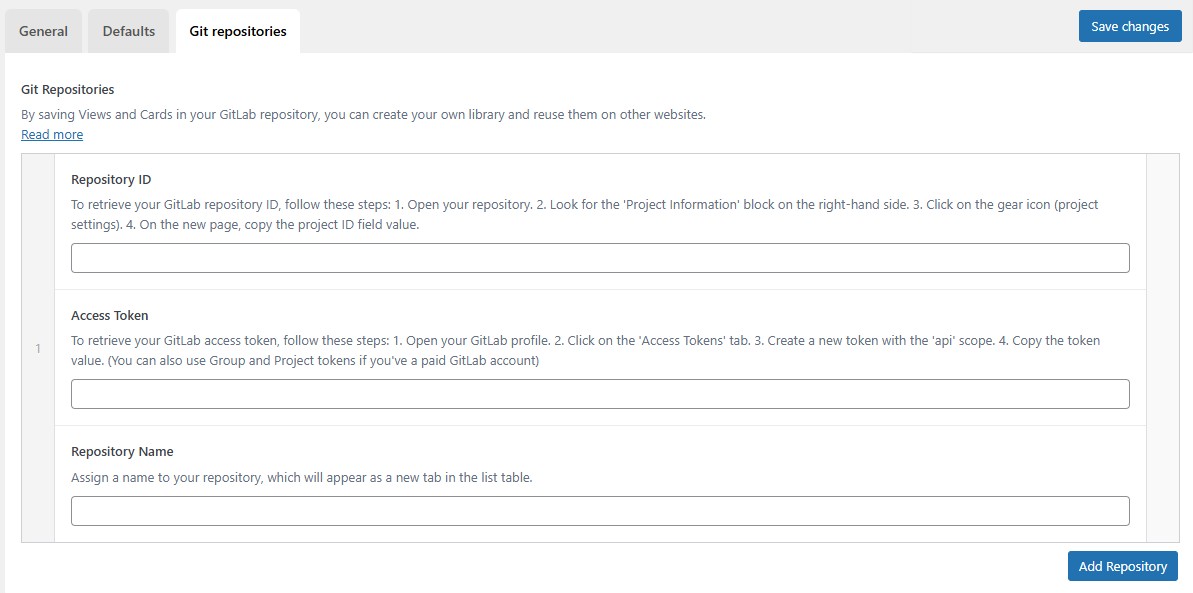
## Git repositories (Pro)
By saving *Layouts* and *Post Selections* in your GitLab repository (free tariff), you can create your own library and reuse them on other websites. [Read more](https://docs.advanced-views.com/templates/reusable-components-library-pro)
### FAQs
How do I delete the plugin data?
When you deactivate the Advanced Views plugin a small survey appears and below that an option to delete data upon deactivation.
---
# Agent Instructions: Querying This Documentation
If you need additional information that is not directly available in this page, you can query the documentation dynamically by asking a question.
Perform an HTTP GET request on the current page URL with the `ask` query parameter:
```
GET https://wplake.gitbook.io/advanced-views/tools/settings.md?ask=
```
The question should be specific, self-contained, and written in natural language.
The response will contain a direct answer to the question and relevant excerpts and sources from the documentation.
Use this mechanism when the answer is not explicitly present in the current page, you need clarification or additional context, or you want to retrieve related documentation sections.